

Blog
Introduction
The Blog extension adds a full blog management experience to Magento 2. It provides admin tools for posts and categories, storefront list and detail pages, sidebar blocks, and CMS widgets for reusable blog sections. It is built with a modern architecture supporting both traditional Luma themes and modern Hyvä Themes, as well as Headless/PWA storefronts via GraphQL.
Technical Requirements
- Magento: 2.4.x
- PHP: 8.2 or higher
- Dependencies: Requires
CodingAnts_Core.
Installation
Luma / Blank Theme
Hyvä Theme
Because this module introduces new Tailwind utility classes, you must generate the Hyvä configuration and recompile your theme's styles after installation:
Recompile your active theme's Tailwind CSS:
Configuration
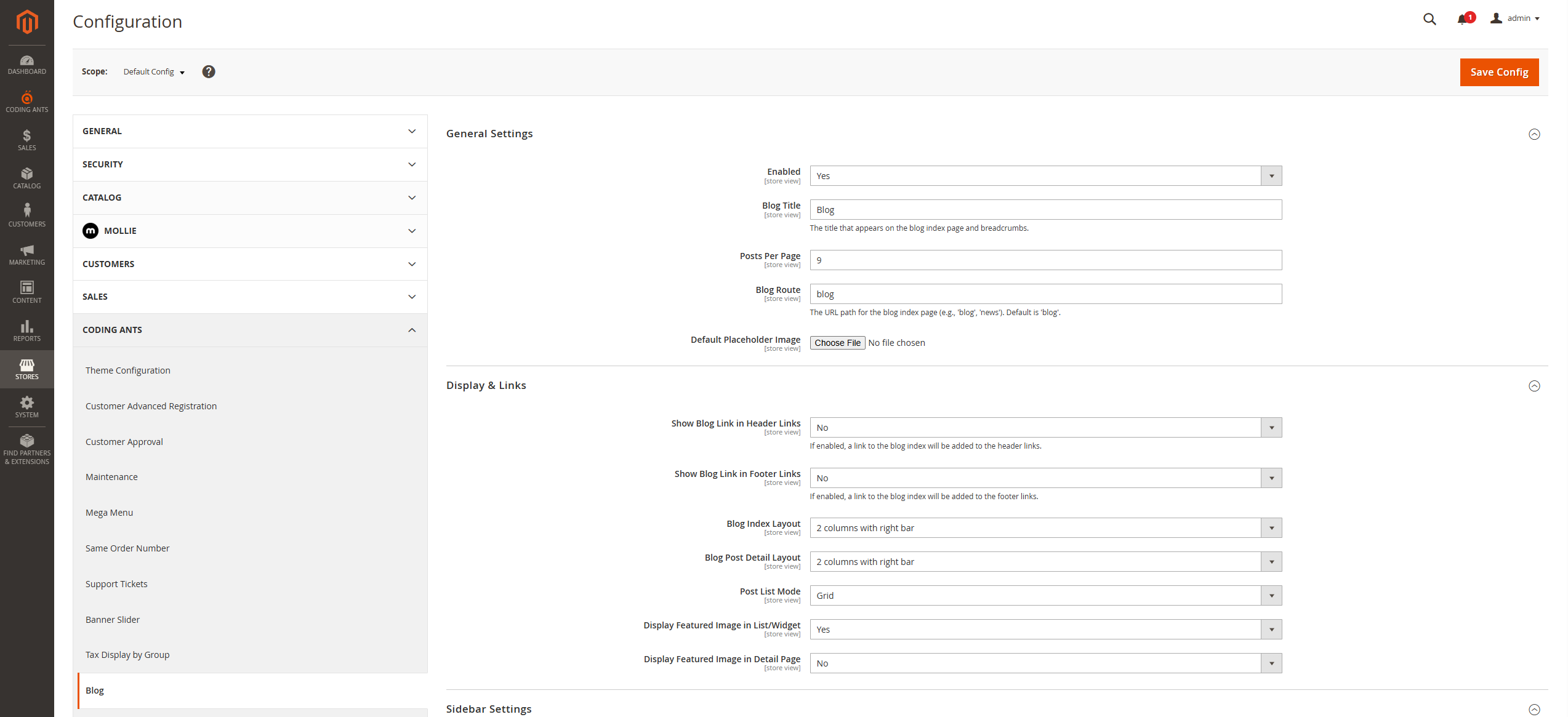
Please navigate to Stores > Configuration > Coding Ants > Blog to configure.
General Settings
Use this section to control the core behavior of the blog:
- Enabled: Enable or disable the blog module.
- Blog Title: Title shown on the blog index page and breadcrumbs.
- Posts Per Page: Pagination size for the blog list.
- Blog Route: Frontend URL key (for example
blog). - Default Placeholder Image: Default image used when no featured image is set.
Display & Links
Configure how and where the blog appears:
- Show Blog Link in Header Links: Adds a blog link to the header.
- Show Blog Link in Footer Links: Adds a blog link to the footer.
- Blog Index Layout: Page layout for the blog list.
- Blog Post Detail Layout: Page layout for the blog detail.
- Post List Mode: Grid or List mode.
- Display Featured Image in List/Widget: Toggle list/widget images.
- Display Featured Image in Detail Page: Toggle detail page image.
Sidebar Settings
Configure sidebar content:
- Show Categories in Sidebar
- Show Recent Posts in Sidebar
- Recent Posts Limit
SEO Settings (Index Page)
Define the SEO metadata for the blog list:
- Meta Title
- Meta Keywords
- Meta Description
Admin Usage
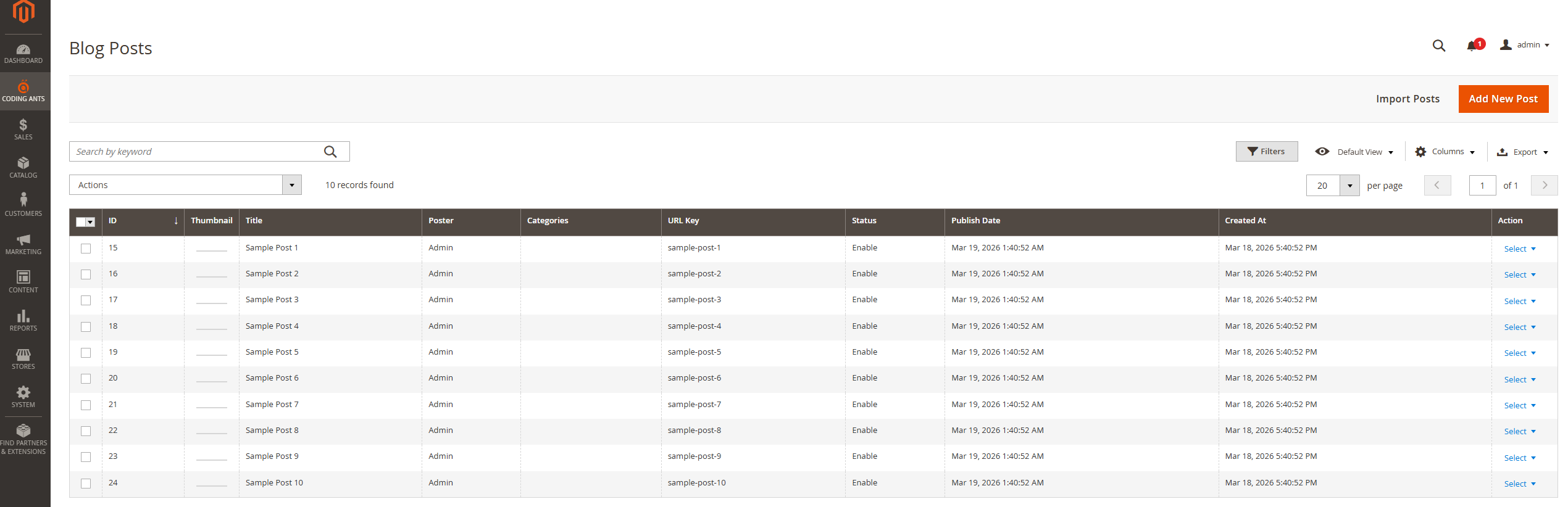
Navigate to Coding Ants > Blog > Posts for post management.
Post List
- Search, filters, and sorting are available.
- Status displays as Enabled / Disabled.
- Mass actions: Delete / Enable / Disable.
Create or Edit a Post
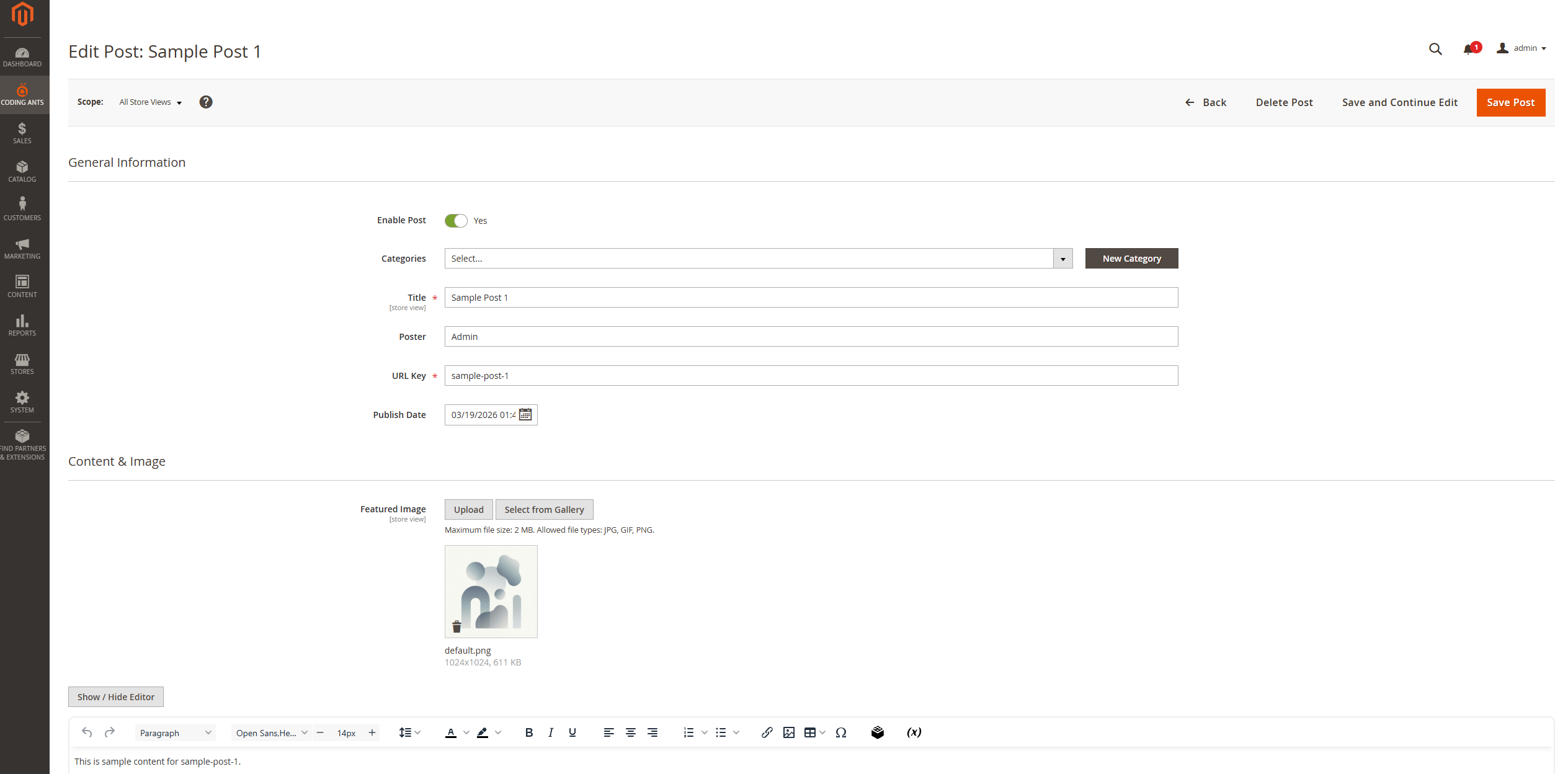
Main fields:
- Enable Post
- Categories: Multi-select with a "Quick Add" modal for new categories.
- Title
- Poster: Leave empty to use current admin username.
- URL Key: SEO-friendly URL slug.
- Publish Date: Control when the post becomes visible.
- Featured Image: Upload new or select from the Media Gallery.
- Content: Full WYSIWYG editor support.
- SEO fields: Individual Meta Title, Keywords, and Description for each post.
Widgets
You can insert the following widgets into CMS pages or blocks.
Coding Ants Blog Post List
Displays a configurable list of blog posts.
- Parameters: Title, Category Filter, Posts Count, Display Mode (Grid/List), Toggle Image/Date/Excerpt.
Coding Ants Blog Carousel
Displays featured posts in a touch-enabled carousel.
- Luma: Powered by Owl Carousel.
- Hyvä: Powered by a custom Alpine.js slider (CSP compliant).
- Parameters: Autoplay, Loop, Navigation Arrows/Dots, and Responsive Breakpoints (e.g.,
0:1; 768:2; 1024:3).
Hyvä Theme Compatibility
The extension includes a dedicated compatibility module (CodingAnts_BlogHyva) that provides a high-performance frontend experience:
- Tailwind CSS: Fully styled using Tailwind for a modern, responsive look.
- Alpine.js: Interactive components (like the carousel) are built with Alpine.js, ensuring zero jQuery dependency and full CSP compatibility.
- Automatic Template Swapping: The module automatically detects the active theme and uses Hyvä templates when appropriate, making it safe for multi-store environments where Luma and Hyvä coexist.
- Responsive Design: Mobile-first approach for all blog pages and widgets.
GraphQL Support
For headless or PWA implementations (like ScandiPWA, Vue Storefront, or custom React/Next.js frontends), the extension provides comprehensive GraphQL support.
Sample Queries
Fetch Post List:
Fetch Post Detail: