

Announcement Bar
Introduction
CodingAnts Announcement Bar is a powerful and highly customizable Magento 2 extension designed to help merchants effectively communicate with their customers. Whether it's for promotions, free shipping thresholds, flash sales, or important store updates, this extension allows you to quickly create and manage attractive announcement bars across your storefront.
The extension supports multiple display types (Regular, Marquee, Carousel), advanced targeting (by Store Views, Customer Groups, and specific pages), and built-in statistics tracking, providing everything you need to boost customer engagement and conversion rates.
Installation
Luma / Blank Theme
Hyvä Theme
Because this module introduces new Tailwind utility classes, you must generate the Hyvä configuration and recompile your theme's styles after installation:
Recompile your active theme's Tailwind CSS:
Global Configuration
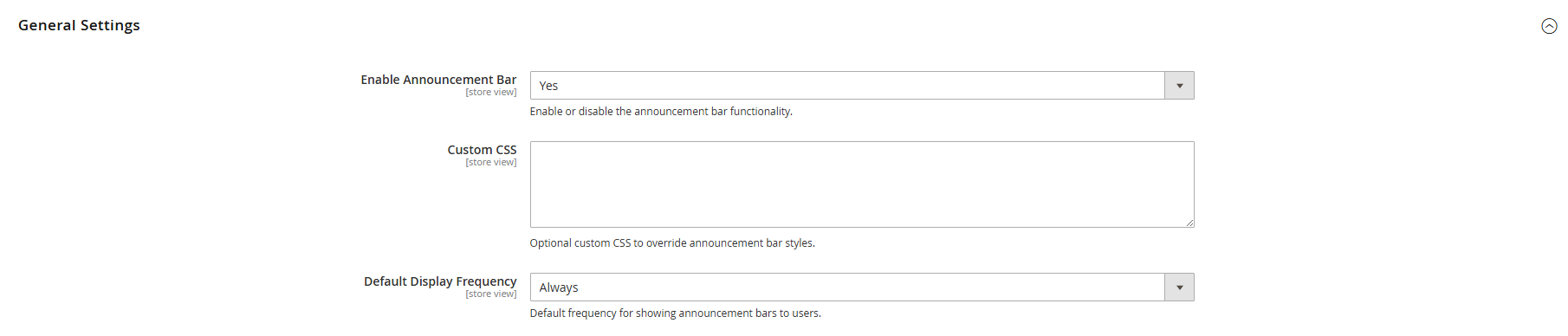
Please navigate to Stores > Configuration > Coding Ants > Announcement Bar in the backend to configure:
- License Key: Enter the valid License Key obtained after your purchase.
- Enable: Set to
Yesto enable the global announcement bar functionality.
After configuration, please remember to save and refresh the cache (Cache Management).
Managing Announcement Bars
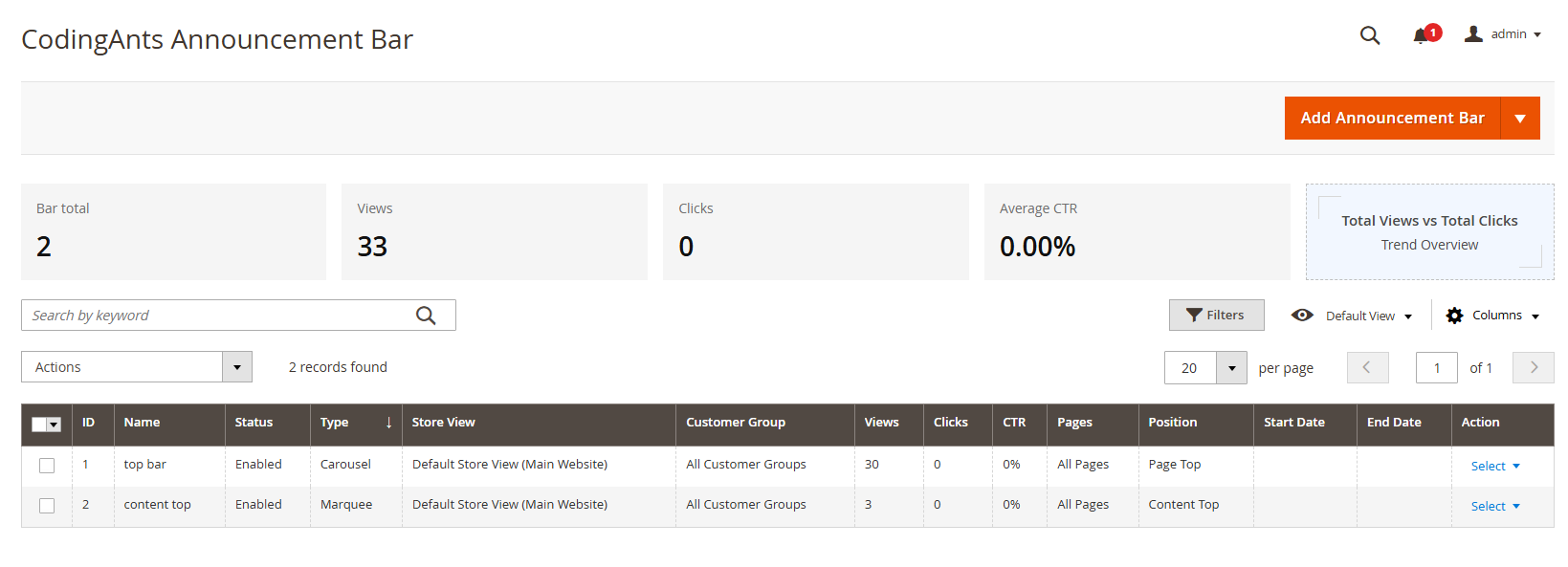
Navigate to Marketing > Coding Ants > Announcement Bars, where you can view and manage all your announcement bars. Click Add New Bar to create a new announcement bar.
1. General Settings
In this tab, configure the basic information of the announcement bar:
- Name: Enter a name for internal use.
- Status: Enable or disable the announcement bar.
- Priority: Set the priority. When multiple bars meet the display conditions, the one with higher priority will be displayed first.
- Type: Choose the display type of the announcement bar:
- Regular: Regular static text.
- Marquee: Scrolling text.
- Carousel: Sliding multiple messages.
- Store Views: Select which store views to display the bar on.
- Customer Groups: Select which customer groups to target (e.g., Not Logged In, VIPs, etc.).
- Start/End Dates: (Optional) Set the active and inactive dates, perfect for time-sensitive promotions.
2. Design Options
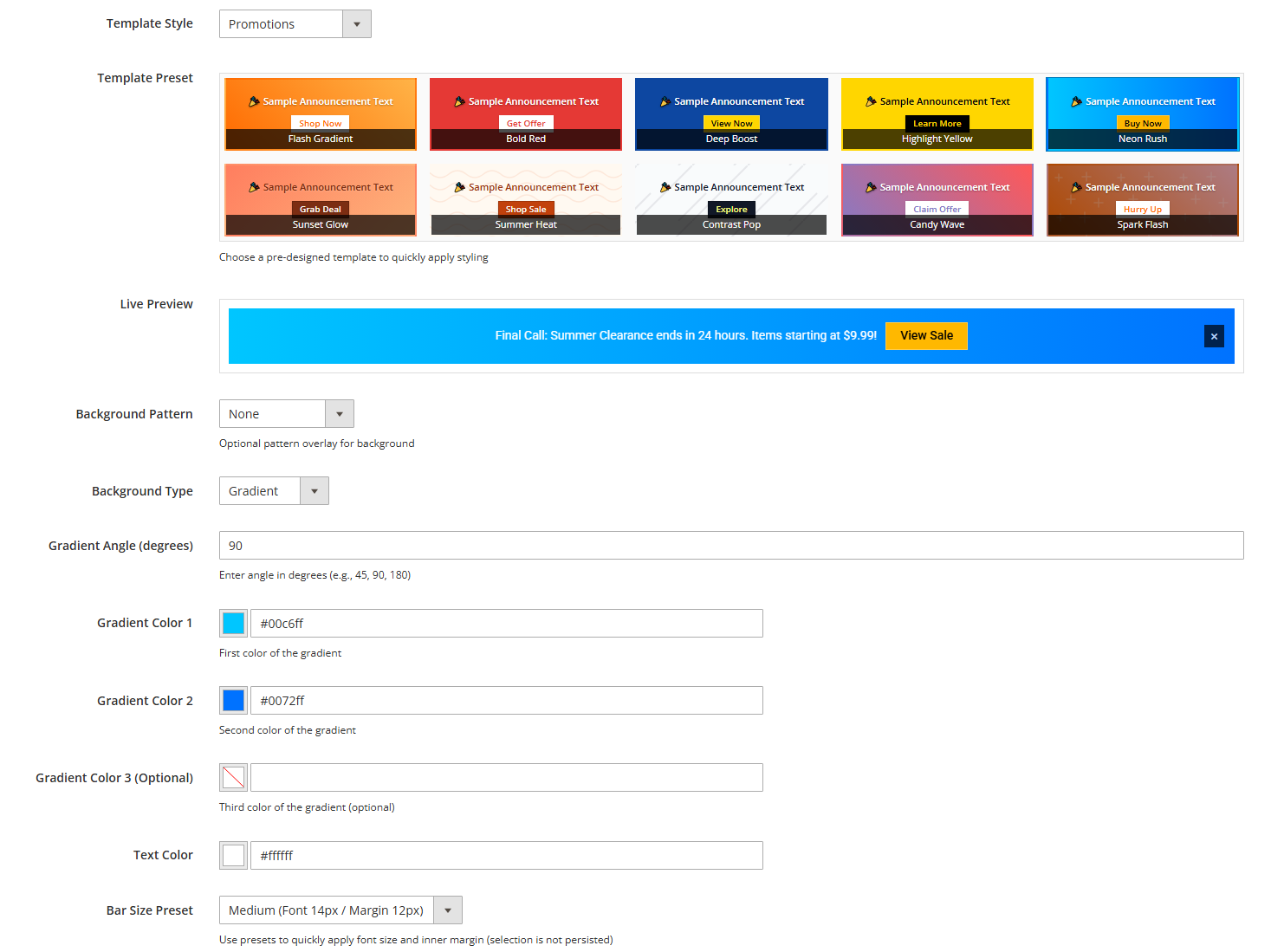
In the Design tab, you can use the Live Preview feature to see exactly how the bar will look in real-time as you edit.
- Template Preset: Quickly select a preset template to apply a full set of styles.
- Background: Supports solid color or multi-color gradients (with customizable angles).
- Typography: Customize text color, font size, and font family (supports custom typography like Google Fonts).
- Close Icon: Configure the visibility and color of the close button. Once enabled, customers can close the announcement bar on the frontend (the closed status is saved via cookies to avoid repeatedly bothering the customer).
3. Content Settings
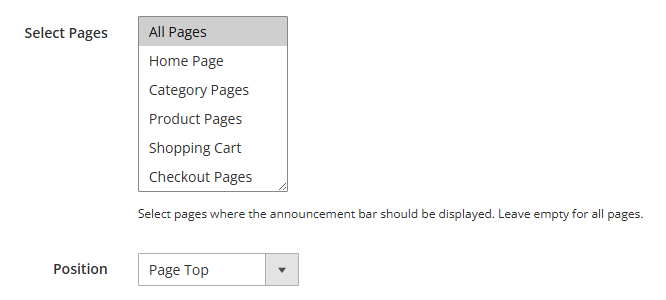
In this tab, configure the display position and the specific messages:
- Position: Select the position of the announcement bar on the page:
- Page Top
- Content Top
- Content Bottom
- Page Bottom
- Display On: Define which pages the bar should appear on (supports all pages, or restricted to specific pages like Home, Category, Product, Cart, Checkout).
- Messages: Add one or multiple messages using the dynamic rows. For each message, you can set:
- Text: The main text of the message.
- Link URL: The destination link URL.
- Link Text: The text for the button or link.
- Target Window: Whether to open the link in the current window (Self) or a new window (Blank).
Statistics Dashboard
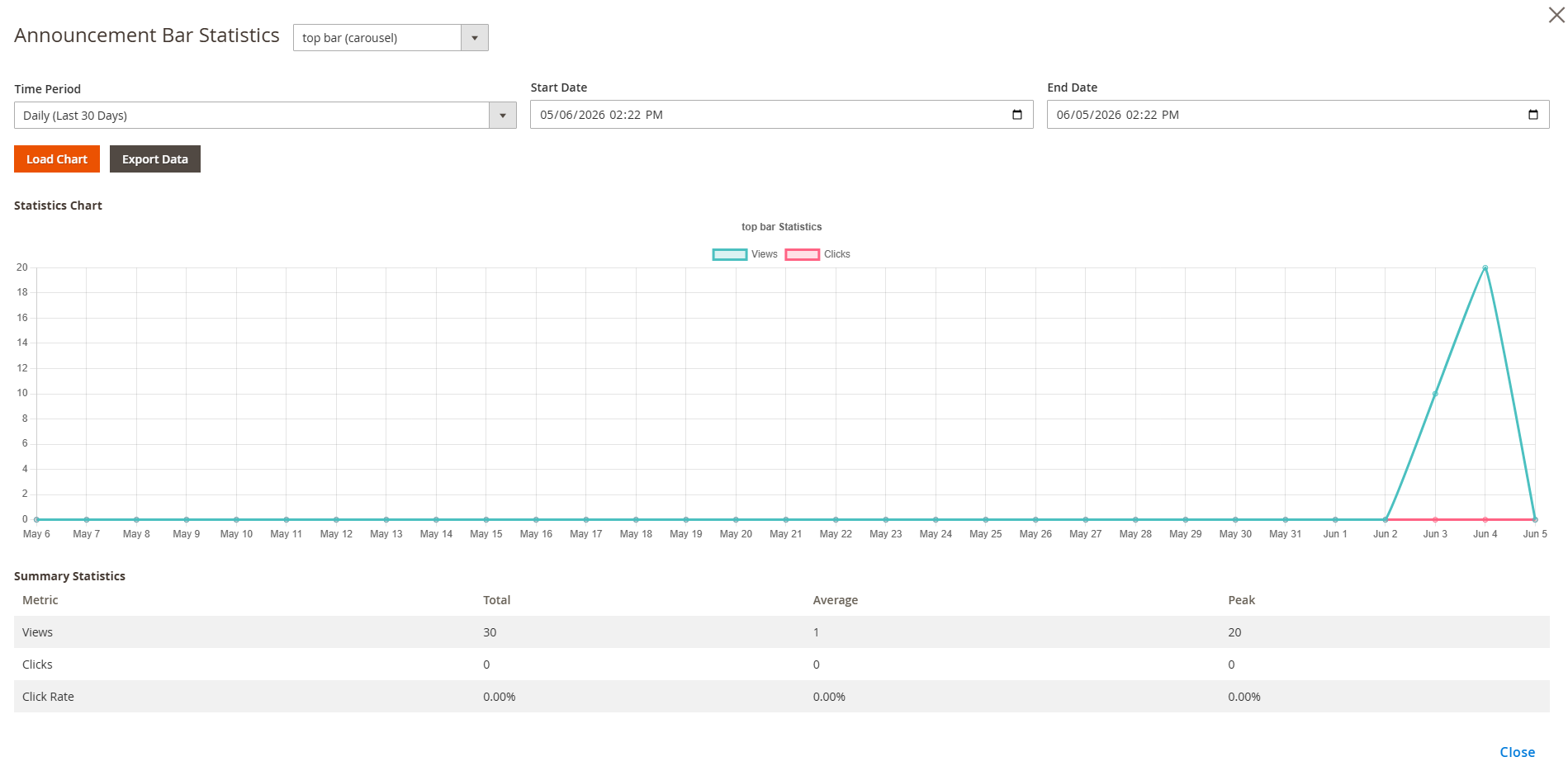
This extension features built-in performance tracking and statistics to help you analyze the effectiveness of your announcement bars:
- On the Marketing > Coding Ants > Announcement Bars grid page, you can view high-level metrics for each bar.
- By accessing the detailed statistics dashboard, you can view visual charts of Views, Clicks, and Click-Through Rates (CTR) across different time periods, evaluating average and peak performance.
Frontend Display Effects
Depending on the chosen type, the announcement bar will display differently on the frontend:
Regular Text Mode
 Displays a single static message or key promotional information clearly and concisely.
Marquee Mode
 Automatically scrolling text, ideal for displaying lengthy news or continuous promotions.
Carousel Mode
 Smoothly slides and switches between multiple messages, allowing users to read more announcements in the same space, increasing engagement.
Storefront Overview
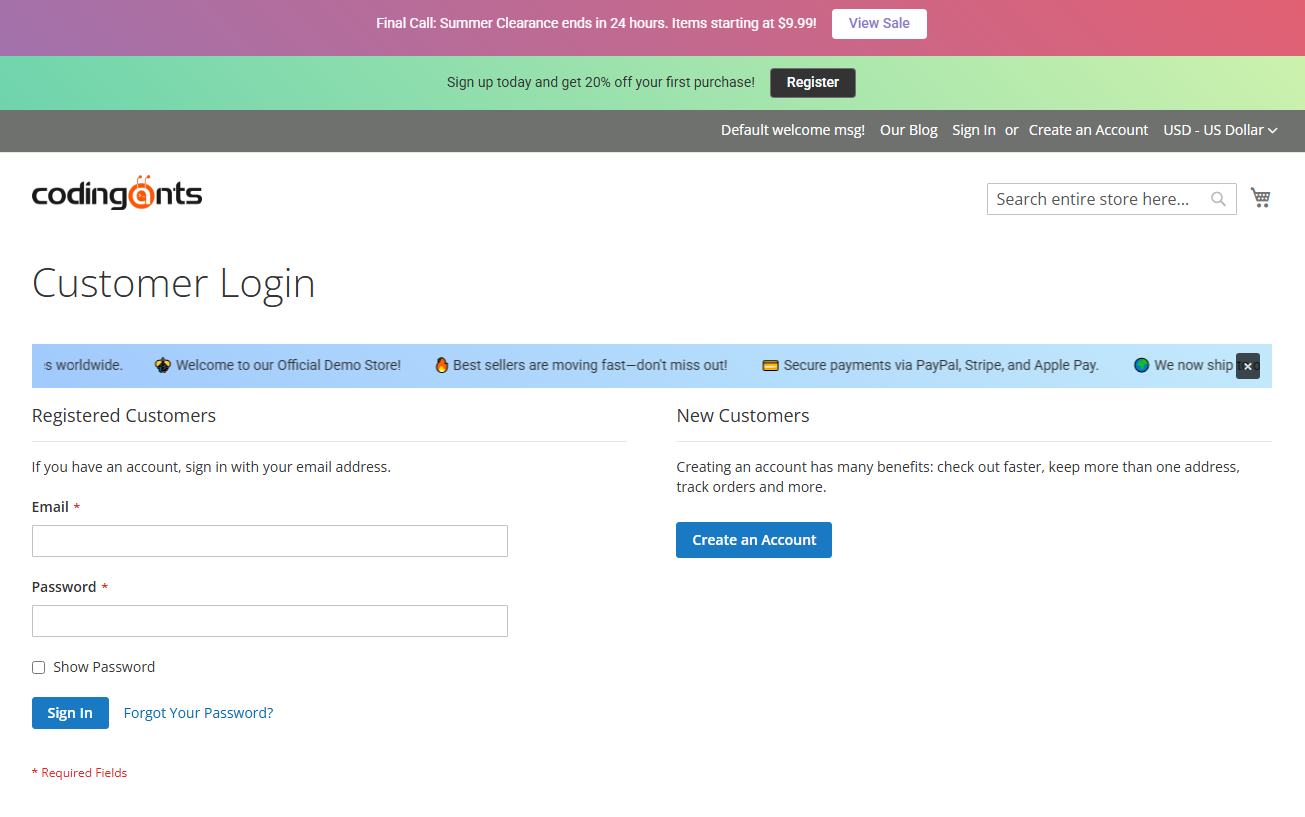 A seamless, fully responsive announcement bar that perfectly integrates with your store's theme. It ensures your promotions and critical messages catch the customer's eye instantly across all devices, driving higher engagement without interrupting the shopping experience.
Hyvä Theme Compatibility
The CodingAnts_AnnouncementBarHyva module provides full Hyvä storefront support, replacing the Luma-based templates with Tailwind CSS and Alpine.js implementations.